Chat
Compose on Home, work in threads, attach files, search the web, and share a conversation.
Type on Home or open Chat and click New chat. The first send from Home creates a thread and moves you to /chat.
The composer placeholder is Ask anything. Welcome suggestions sit under it on Home.
Attachments and web search
Click Add photos & files to attach images or documents.
Toggle Web search on the composer when the agent should look outside your connectors.
Slash commands
Type / in the composer:
| Command | What it does |
|---|---|
/translate-en | Translate to English |
/translate-de | Translate to German |
/image | Generate an image |
Approvals
Write actions on connectors show Approval required. Click Approve or Deny on the tool card.
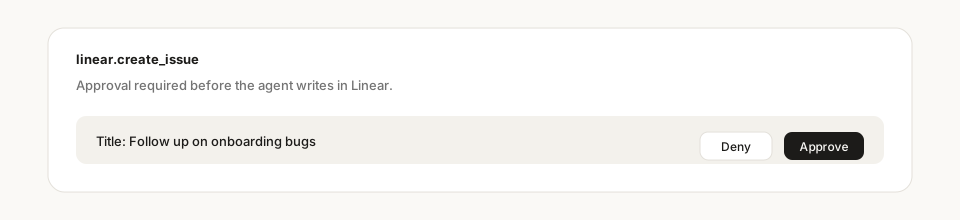
Auto-approve on the thread runs approval-gated actions in that conversation without asking again. It applies to you only, on that thread.
Auto-approve is per thread
It does not follow you to the next chat, and it does not pre-authorize a scheduled job. Turn it on when you trust the next few writes in this conversation.
Share a thread
Click Share. People you add from the org become collaborators. Everyone sees the full conversation, including connector results from each participant. The agent uses the connectors of whoever sends the next message.
You can leave a shared chat. The owner stays.
A scheduled run can write into a thread. The UI says when that is happening.
History
The sidebar lists chats grouped by Today, Yesterday, and Earlier. Archive or delete from the row menu. History is the searchable archive of chats, agent threads, and schedules.
Stedia can make mistakes. Treat tool results as work to review, not a finished handoff.